Ads 468x60px

New iPhone Apps: A Wish Come True for Lawyers

Constantly running from one meeting to another with clients and business associates, while on the look-out for various other cases with individuals and big corporate companies, a lawyer is forever busy. The one thing that the lawyer community could really do with would be for great new apps for the iPhone that strive to assist them and make some breathing space in their professional life.
Some of the popular new iPhone apps for lawyers include:
  • Court Days App: A lawyer is after all only human, and so to forget certain dates and times of meetings and cases especially if he/she is associated with more than one jurisdiction is but natural. However, with new apps such as Court Days to the rescue, lawyers can always stay up-to-date about their various case dates and meetings by logging the information into this virtual diary. The app also strives to count the days left between each court date, constantly reminding the user that the d-day is coming closer.

  • BARBRI App: This app is not only for lawyers, but also for law students looking to either go through an important case or appearing for their BAR exams. With such interesting new apps, users can go through the app's enormous database and search for cases pertaining to their situation or even review notes. This app also boasts of a particular feature called the BARBRI challenge, where the user that takes it is constantly reminded as to how well he/she is acquainted with the subject of law.

  • Black's Law Dictionary App: Legal jargon is what lawyers are really good at. But at some point or the other even the best of the best can be left speechless. This app is made for such moments and more. With over 43,000 definitions and many more quotes and data, this app never lets you down, especially when you're required to show-off your skills in the courtroom.

  • Wikipanion App: This new app directly links you to Wikipedia for last minute reference to cases and certain terms and agreements. It's not only good for litigators, but exceptionally useful for the common man as well.

  • NetNewsWire App: World and local news is a must for every individual, especially for lawyers, as keeping up with the latest happenings around the world is an added advantage. With such new apps you can do exactly that and much more. NetNewsWire directly links users to all the blogs and information on the internet regarding a particular news item, thus giving one a variety of perspectives. Articles can also be marked and kept for later reference.
Sean Casto is CEO & Founder at PreApps since 2012. PreApps is the original and exclusive platform introducing new apps for iPhone, Android and iPads prior to their release.

Samsung Galaxy S3 Smartphone Review - Design and Performance


In this second and final part of our review, we discuss the design and performance aspects of the Samsung Galaxy S3, one of the most successful smartphone handsets ever released.
S3 Design
The Galaxy S3 is surprisingly light and slender considering the size of the screen. It is only 8.6mm thick (the Galaxy S2 was 8.9mm thick) and weighs 133g. By comparison the HTC One X is 8.9mm and 130g whilst the iPhone 5 is 7.6mm thick and weighs a feather-light 112g. The new Galaxy S4 with its Sony Xperia Z rivalling 5 inch screen is 7.9mm thick and 130g.
A smoother, rounder look debuts on the S3 taking over from the more rectangular look of its predecessor, the S2. The pebble-style casing reminds us of the Galaxy Nexus smartphone and although doesn't look that modern, the gentle curves allow the hand to mould around the device. It is good to see that the camera is now almost flush with the main body of the phone as opposed to the slightly ugly and awkward raised lens housing sported by the S2.
As is now standard Android smartphone fare, the three back, home and menu buttons are at the bottom of the screen, with only the home button a physical one, the other two being touch sensitive. The other keys are the power or lock key and the volume rocker switch, both located on the top right-hand side of the casing.
For a once range topping device the S3 feels a little cheap. Too much plastic is definitely the culprit and although it is of good quality, without any nicer materials such as aluminium, titanium or Kevlar (as found on the Motorola Razr i XT890) it really struggles to feel premium. We'd much rather have a little extra weight if it meant we could loose a bit of the plastic.
The acres of smooth plastic also don't help with the handling of the device as it is often a little too shiny and slippery to be gripped firmly. For those looking for a more upmarket feel, the HTC One, iPhone 5 and Sony Xperia T are three smartphones that offers more premium materials.
The S3 is available in blue or white, but as with most of Samsung's popular handsets, look out for special edition colours such as red, pink or silver in the future.
S3 Performance
The S3 packs a 1.4GHz quad-core processor inside its slender shell, and although the handset has been superseded by the S4 (although not replaced, it is now seen as a 'budget' model) it still has more then enough power, both in terms of data processing and graphics rendering. HD video is handled extremely well and general in-use performance feels really slick, lacking the sluggishness often present on lower end handset such as the Nokia Lumia 520 or Sony Xperia J. It also manages to beat the similarly priced Motorola Razr i, for the most part because the Razr relies on a fast but single core only CPU.
The S3 even compares well to the latest handsets such as the iPhone 5 and Sony Xperia Z, with the S3 having plenty enough power to tackle most of the games in the Google Play store.
Large, high-definition screens, multi-core processors and the desire for slimmer handsets are all the enemy of acceptable battery life. To combat this, Samsung has given the S3 a power saver mode to extract the maximum battery performance by limiting CPU use, wireless activity, screen brightness, altering background colours and limiting vibrations and sound feedback. This, coupled with the user removable 2,100mAh battery, allows the Samsung to achieve more than acceptable battery performance.
It is worth noting that Samsung sell a larger 3000mAh replacement battery for around £45. Those that may be interested in this product need to note that the battery is slightly larger than the standard one, so it comes with a slightly chunkier back cover.
Conclusion
The Galaxy S3 can be seen as an evolution of its predecessor, with the notable enhancements being a bigger screen, more CPU power and a slimmer design.
The fact that the newer Galaxy S4 and Xperia Z haven't really made the S3 look dated are testimony to the specification that is packed into this handset. With a powerful processor and a 4.8" screen the S3 will be a relevant phone for several years to come. It also poses the question of whether top tier smartphones such as the Google Nexus 4, HTC One, or Sony Xperia Z are really worth the additional cost.
The Galaxy S3 is without doubt one of the best value handsets on the market. With ample screen size and impressive processing power the device will easily stand up to handsets such as the Sony Xperia Z or HTC One. If you really do want to pay extra for the latest smartphone, then the S3's successor the Samsung Galaxy S4 is an option worth considering, although you need to be sure that you will make use of the extra features over the previous generation handsets. Thank you for reading our review.

The iPhone 5S Rumors


One of the leading Smartphone manufacturers, Apple, is indeed hell bent on dominating the Smartphone market. One would expect them to at least hold off on manufacturing a new phone so soon after their last release. Well, it seems that is not part of their ethos. Only 6 months after iPhone 5 was released, fresh rumors were hitting the market that a new iPhone was in the process of being manufactured. If this rumor was true then the most probable phone to expect is iPhone 5S. This assumption is largely based on their past trend of releasing the 'S' range soon after the original model.
The rumors are not all centered on iPhone 5S, there are some who believe that Apple is working on iPhone 6. This is not impossible as it would be an appropriate response to Samsung's Galaxy S4. However, iPhone 5S is the more likely of the two. As it was in the previous 'S' phones: iPhone 3GS and iPhone 4S, the changes that would be made to the phone are not drastic enough to deem it a new phone altogether. iPhone 5S should have a few hardware improvements and some software tweaks but nothing too major.
iPhone 5S: Release Date
Rumors concerning the release date of iPhone 5S are all over the place with some saying that we should expect a spring 2013 release and some arguing that it will be much later than that. The most consistent rumor, and this is what we can bank on, is that iPhone 5S will be released in 2013. Some of the sources are claiming that the manufacturing process of iPhone 5S began in March, and as such we should expect a June release.
iPhone 5S: Display
Apple is going to fit a Super HD screen on iPhone 5S, and according to the China Times, it will also feature a 'Touch on Display' with a 10-Point multi touch panel. It should, however, be noted that China Times have not always hit the mark with their speculations.
iPhone 5S: Design
As earlier noted, the design of iPhone 5S is not expected to veer so much from the course taken by iPhone 5. The chassis is definitely going to be the same, unless Apple has a wild card up their sleeves which is somewhat unlikely.
It has however been rumored that Apple are seeking to procure a cheaper plastic from their usual preference. This, of course, is set to reduce the cost of the phone they would be making. There are, however, rumors that suggest that this move has nothing to do with iPhone 5S. In fact, many are of the belief that Apple are working on a cheaper brand dubbed iPhone Math. The story is that this phone is designed to cater to the needs of a different market base for Apple's usual customers.
iPhone 5S: Camera
iPhone 5S will feature a 13MP camera and a bigger and brighter flash. This is according to the update received on iLounge earlier in the year. This update is a significant step from the 8MP on iPhone 5, but it will not wow many people as we have already seen a similar feature on Samsung Galaxy S3 and HTC One.
iPhone 5S: NFC
In the past, many analysts have said that Apple will eventually make the switch to NFC and Apple has proved them wrong every time. In fact, iPhone 5 featured passbook which is an almost similar feature. Nevertheless, rumors now suggest that Apple will make the switch with iPhone 5S.
In addition to the NFC, it is expected that iPhone 5S will incorporate a finger print scanner in iPhone 5S. This rumor is backed by Apple's move of purchasing the mobile security firm AuthenTec. The fingerprint scanner is a feature that was expected to be on iPhone 6 but we might see an early test run on iPhone 5S.
iPhone 5S: Software
According to some sources, Apple has already started testing iOS 7 on some devices. Therefore, we could expect a pleasant surprise on iPhone 5S as the Smartphone could run on iOS 7.
iPhone 5S: Wireless Charging
Rumor has it that Apple has had a breakthrough in the wireless charging technology as they recently filed for a patent on the same technology. Therefore, we could expect iPhone 5S to feature wireless charging which would be super convenient.
While these rumored could as well be unfounded, stay tuned to get the latest rumors on iPhone 5S.
http://www.trondome.com/articles

Showroom 4 Theme For iPhone

  Description

This is my 4th Showroom Theme in the "Showroom" series and is now the most downloaded and the most popular of all my Themes. This 4th Theme has a great set of icons, a brick wall backdrop, and a dark aged wood floor. It is simple, clean, and elegant!

My themes are a bit different than a lot of other themes because I try to create "everyday" type "clean" looking themes with interesting high quality icons. These are the kind I've found most people really want on their phone permanently. They do not stick with the weird or single color themes very long. If you have any problems installing it, always make sure your SummerBoard Mode is switched "On" when installing my themes with Winterboard.


Face Recognition: U.S. police utlisera an iPhone app


Part of the American police will soon be equipped with an iPhone application to face recognition.

In September, a dozen U.S. states equip their police iPhone. They will be connected to mobile devices face recognition developed by BI2 Technologies, a company in Massachusetts.

It will be used only by the police if they have no other way to identify a person interpelée. Some officers also seem to worry about this new feature for civil liberties. Shoot someone from a distance is a very different approach of fingerprinting can be done only with the consent of the person. Some sheriffs on and announced that they intend to use it with caution.

Face recognition has entered the lives of millions of Apple users (iPhoto), Google (Picasa) or Facebook. Google was even suspended in May a draft facial recognition mobile googling that allowed the face of any person photographed in the street. The experience of the American police will indeed defuse the first legal complaints about this issue.

Find a lost phone


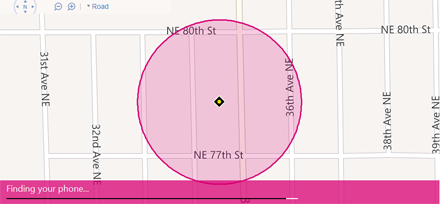
It's nerve-wracking when you can't find your phone—whether it's truly lost, or just stuck between the sofa cushions. Find My Phone can help lay your worry to rest. This free service at the My Phone section of windowsphone.com can ring, lock, erase, or show your phone on a map from any Internet-connected computer. Find My Phone makes it easier to recover your phone, or to prevent someone from using it without your permission.
Find My Phone map showing a phone's location

To sign in to Find My Phone for the first time

The first time you use Find My Phone, you'll need to sign in to it using your Microsoft account.
  1. On your computer, go to windowsphone.com.
  2. Point to the phone in the upper-right corner, and click Find My Phone. If you're prompted, sign in with the same Microsoft account you used to sign in on your phone.

To map your phone's location

  1. On your computer, go to windowsphone.com.
  2. Point to the phone in the upper-right corner, and click Find My Phone. If you're prompted, sign in with the same Microsoft account you used to sign in on your phone.
  3. On your computer, go to the Find My Phone page on windowsphone.com and sign in with the same Microsoft account you used to sign in on your phone.
  4. Do any of the following:
    • Not seeing the latest location? Click Refresh.
    • If you'd like to make a hard copy of your phone's location, click Print.
    • If you've scrolled the map and lost track of your phone's location on it, click Center on map.

    Note

    If we can't find your phone right away, we'll offer to keep trying if you'd like, and we'll send you an email if we find it. (You can change your email address at any time in Account settings after you sign in to windowsphone.com with your Microsoft account.)

To make your phone ring

  1. On your computer, go to the Find My Phone page on windowsphone.com.
  2. Click Ring, and then follow the instructions to ring the phone.

    Tip

    When you ring your phone, it will ring even if the volume is off or it's in vibrate mode.

To lock your phone and show a message

  1. On your computer, go to windowsphone.com.
  2. Point to the phone in the upper-right corner, and click Find My Phone. If you're prompted, sign in with the same Microsoft account you used to sign in on your phone.
  3. Click Lock, and then follow the instructions. If you don't already have a password set up on your phone, you'll need to enter one—you'll use it to unlock the phone if you get it back.

    Note

    If we can't lock your phone right away, we'll offer to keep trying. We'll send you an email if we succeed.

    Tip

    You can also type a message to display on your phone's lock screen. Consider providing a phone number or an email address in the message, so someone who finds your phone can contact you.

To erase your phone

If you're certain you can't get your phone back, or if you have sensitive information on it that you want to protect until you recover it, you can erase your phone remotely.
  1. On your computer, go to windowsphone.com.
  2. Point to the phone in the upper-right corner, and click Find My Phone. If you're prompted, sign in with the same Microsoft account you used to sign in on your phone.
  3. Click Erase.
  4. If you're absolutely, positively sure, select the Yes! Erase my phone immediately check box, and then click Erase.

    Notes

    • If we can't erase your phone right away, we can keep trying. We'll send you an email if we succeed.
    • It's a good idea to let your mobile operator know that you've lost your phone.

To change settings for Find My Phone

You can set up Find My Phone to save your location every few hours or to use push notifications instead of text messages to send commands (and apps) to your phone faster and more cheaply. Change these settings on your phone, not on your computer.
  1. In the App list, tap Settings Settings icon, and then tap Find my phone.
  2. Select either or both of the following:
    • Send apps to my phone using push notifications (not SMS). The Find My Phone service and the Windows Phone Store on the web use text messaging to send commands and apps to your phone. Check this option to use push notifications instead. Why? Push notifications can be faster than text messages, and if your mobile operator charges you for each incoming text message, push notifications might also be cheaper. Also, My Phone can only send 15 text messages to your phone in a three-day period. With push notifications, there's no limit.
    • Save my phone's location periodically and before the battery runs out to make it easier to find. Microsoft can save your phone's location details every few hours so that if your phone is out of range or the battery dies, we can still show your phone's last known location on a map.

The iPad mini with Hawaiian Airlines


The Hawaiian Airlines has announced the deployment of 500 1 mini iPad in its fleet of 14 Boeing 767-300. These connect the islands of Hawaii with the United States and some Asian countries. The Apple tablet will be loaded with episodes of TV series, movies, and recent games. The iPad mini will be available free of charge to the business class travelers, while economy class passengers can get a mini iPad for $ 15 dollars by booking in advance or 17 dollars for flight.

The offer will be implemented by the company in the month of September. This is the company Blue Avionics who will be responsible for the management of mini iPad in flight including charging systems and change the content. Other companies already offer iPad in flight as JetBlue or American Airlines.

Apple launches its iPhone in recovery


The American brand offers to buy your used smartphones. To encourage you to take the iPhone 5S?

INFO. As reported by Bloomberg as of last June, Apple has launched its back program used iPhone in the United States. The American brand hopes to encourage its users to upgrade to a newer model of his house smartphone. Before launching the iPhone 5S?

How does it work? The iPhone used holders can go to an Apple Store to sell their smartphone. They will thus give a gift only valid in the shops of the Apple brand card. But it is for example possible to use this voucher to buy something other than an iPhone as a computer or an iPod. Apple has yet to release rates of recovery, but according to the information site specializing 9To5Mac, iPhone 5 in good condition would be taken only $ 279, while the new device is priced at $ 679.

Not yet available in France. Unfortunately this program is not yet launched in the United States and the California firm did not provide a date for the resumption of iPhone device used in Europe. No information about prices in Euros times has either been published.
The iPhone color "Champagne" arrives


Objective: To move to the iPhone 5S. The launch of this program comes ten days before the date of submission of the next iPhone: iPhone 5S, at the center of rumors for several months, should indeed be unveiled on September 10. With this new option available in the shop, the Californian brand hopes to encourage his fans to go to the latest smartphone "headed" through its own store network.
Related Posts